SolidWorks Design Checker Alternative
Looking for a SolidWorks Design Checker alternative? ClearHandoff offers AI review of CAD models and drawings from any CAD tool, no SolidWorks license needed.
Looking for an alternative to SolidWorks Design Checker? Whether you’re limited by its SolidWorks-only requirement, frustrated with manual standards configuration, or need something that works across CAD tools, ClearHandoff offers an AI-powered approach to reviewing CAD models and engineering drawings.
What Is SolidWorks Design Checker?
SolidWorks Design Checker is a built-in utility (available in SolidWorks Professional and Premium) that validates drawings and models against a set of configurable rules. It can check things like:
- Font sizes and styles
- Dimension standards
- Material assignments
- Custom property values
- Annotation standards
You define the rules in a standards file, then run the checker against your documents to find violations.
Limitations of SolidWorks Design Checker
While useful within the SolidWorks ecosystem, Design Checker has significant limitations:
SolidWorks-only
Design Checker only works with SolidWorks files. If you review models and drawings from suppliers or customers made in other CAD tools (CATIA, NX, Inventor, Creo), or drawings in PDF format, it simply doesn’t work.
Requires SolidWorks Pro or Premium license
Design Checker isn’t available in SolidWorks Standard. You need Professional or Premium, a significant cost just for checking functionality.
Rule-based, not contextual
Design Checker follows rigid, predefined rules. It can’t understand context, interpret engineering intent, or catch issues that fall outside its configured rule set. If a rule isn’t defined, the issue goes undetected.
Manual standards configuration
Someone on your team has to define every rule manually. This is time-consuming, error-prone, and requires deep knowledge of both the standards and the tool’s configuration format.
Desktop-only
Design Checker runs locally within SolidWorks. There’s no cloud access, no web interface, and no way for non-SolidWorks users (like manufacturing engineers or quality teams) to participate in the review.
No collaboration features
It produces a report, but there’s no built-in workflow for discussing findings, tracking corrections, or managing approvals.
ClearHandoff: A Modern Alternative
ClearHandoff takes a fundamentally different approach to reviewing models and drawings:
AI-powered, not rule-based
Instead of rigid rules, ClearHandoff uses general-purpose AI models to analyze drawings against engineering standards (e.g. ISO 128, ASME Y14.5) and 3D models against your review profile, for example sharp internal corners, thin walls, hole sizes and clashes between parts. It understands context and can catch issues that rule-based tools miss.
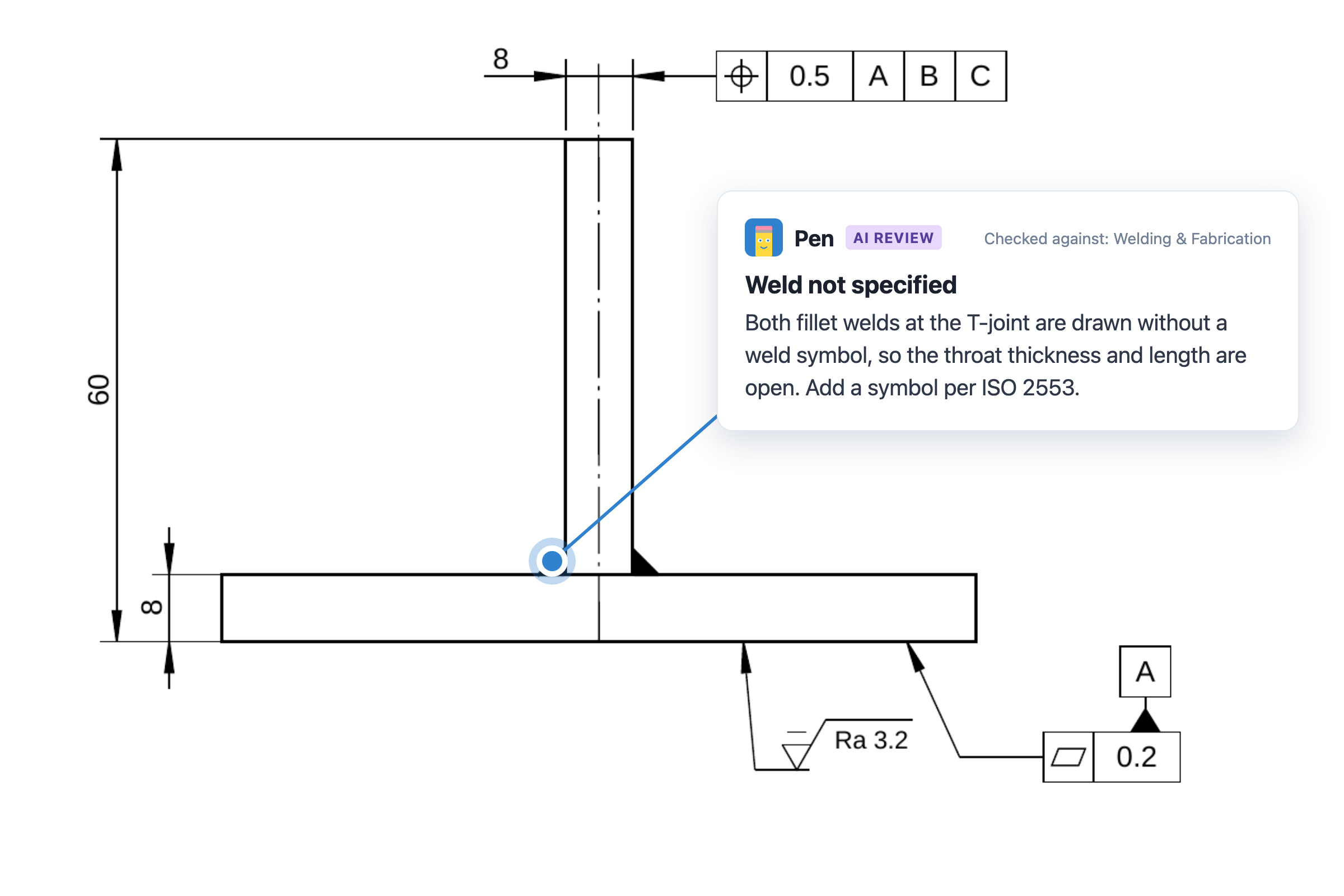
Works with any CAD tool
Upload a STEP model, or a drawing as PDF or DXF. ClearHandoff doesn’t care which CAD tool created it. This makes it a fit for teams using multiple CAD platforms or reviewing supplier files.
Cloud-based with API access
Access reviews from anywhere, on any device. No software installation, no license servers, no IT setup. A REST API lets you trigger reviews from your PDM, PLM, or automation tools and get structured results back.
Built-in collaboration
ClearHandoff includes a full review workflow: AI findings, team comments pinned to the model or drawing, issue tracking, and approval per version. Everyone involved in the design-to-manufacturing handoff can participate.
Always up to date
Standards knowledge is built into the AI and updated centrally. No manual rule configuration required, and you describe company-specific rules in your own words in a review profile.
Comparison Table
| SolidWorks Design Checker | ClearHandoff | |
|---|---|---|
| Supported formats | SolidWorks files only | STEP models, PDF and DXF drawings, from any CAD tool |
| Checking approach | Rule-based (manual config) | AI-powered (general-purpose, standards-aware) |
| License required | SolidWorks Pro/Premium | Standalone subscription |
| Deployment | Desktop (local) | Cloud (SaaS) |
| Integration | SolidWorks only | REST API for PDM/PLM and automation tools |
| Standards covered | User-defined rules | ISO, ASME + review profiles in your own words |
| Setup time | Hours (rule configuration) | Minutes (upload and review) |
| Collaboration | Report export only | Full review workflow |
| Files from other CAD tools | No | Yes (STEP, PDF, DXF) |
| Non-CAD user access | No | Yes (web-based) |
Who Switches to ClearHandoff?
Teams typically look for a SolidWorks Design Checker alternative when:
- They review models and drawings from suppliers or customers made in other CAD tools
- Manufacturing or quality teams need to participate in reviews but don’t have SolidWorks licenses
- They’re tired of maintaining rule files and want intelligent, automatic checking
- They want colleagues to comment on findings and approve the model or drawing in one place, not pass a checker report around by email
- Remote teams need cloud-based access to the review process
- They want to automate reviews as part of their release or check-in process via API
FAQ
Can ClearHandoff check everything SolidWorks Design Checker can?
ClearHandoff reviews both 3D models (as STEP files) and 2D drawings. On drawings, it checks standards compliance, tolerances, title block and dimensions with an understanding of context, not just rule matching. On models, it checks what your review profile asks for, such as sharp internal corners, thin walls, hole sizes and clashes. What it doesn’t check are SolidWorks file properties, such as material assignments or custom properties inside the part file. For those, Design Checker is still the right tool, and the two work side by side: Design Checker for quick in-CAD checks during modeling, ClearHandoff for the formal review of models and drawings before manufacturing release.
How does pricing compare?
SolidWorks Design Checker requires a Professional or Premium license. You can try ClearHandoff with 20 free AI credits, without any procurement. Paid plans have a public price per user with AI credits included, starting at EUR 20 or USD 25 a month. See pricing for details.
Can I migrate my Design Checker rules to ClearHandoff?
ClearHandoff doesn’t use rule files. Its AI already knows the major standards. For company-specific rules, you describe them in your own words in a review profile and can add reference documents such as design guidelines. The approach is different but achieves the same goal with less maintenance.
Try ClearHandoff on your own files
Start with 20 free AI credits, no credit card needed.
Upload a model or drawingOr try an example: a drawing · a 3D model