Pen 2.2: Reviewing ISO GPS drawings
Like many engineers, AI can struggle with applying ISO GPS correctly. Pen's newest version no longer does. We taught it to flag gotchas that are easy to miss.
We just released an upgrade to Pen, our AI drawing assistant that reviews your engineering drawings. In version 2.2 we focused on improving Pen’s understanding of ISO GPS, the ISO family of standards for specifying part geometry and its tolerances (its geometric tolerancing part is what many engineers know as GD&T).
Applying ISO GPS correctly can be tricky. Classical plus minus tolerancing is part of every technical drawing course, and many people understand it intuitively even without training. Some ISO GPS principles go beyond what is typically taught in such a course. And among the teams I speak to in Europe, the majority still haven’t fully switched to ISO GPS.
A typical ISO GPS drawing uses more symbols than one with classical plus minus tolerancing. It also requires the understanding of additional concepts and has several “gotchas” that one can run into if one is not trained in it. For example, putting a tolerance on one feature can unintentionally take that feature out of the general specification.
Here’s an example.1 The part below is a guide bar. In the assembly, a pusher sits on top of it and slides along the bar, guided by two tongues that run in the bar’s grooves.
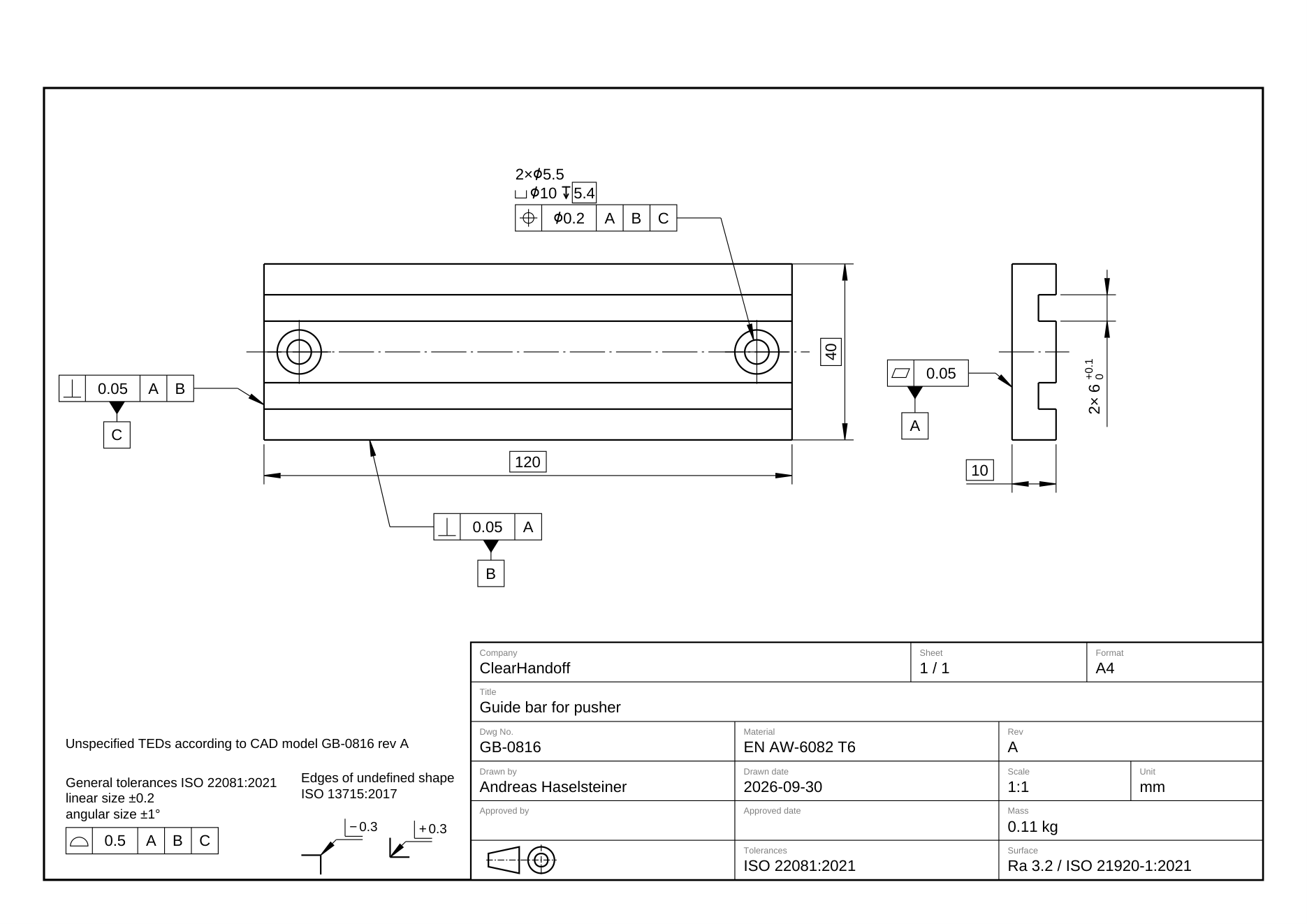
Every hole on this sheet has a position tolerance to the datums A, B and C. Everything else is covered by the general tolerance in the notes: a surface profile of 0.5 to A|B|C, with the nominal geometry from the CAD model.
This way of tolerancing, where the drawing does not show all dimensions but refers to the CAD model, is used by some companies. They prefer it because there’s less clutter on the drawing compared to a drawing that holds all dimensions. Other companies do full dimensioning, and engineers who are used to that might feel the itch to call this drawing wrong as it “misses some dimensions” if they overlook the note referring to the CAD file. Finding missing dimensions is one of the most common things our users ask Pen for. On a drawing like this one, Pen has to recognise that the dimensions are in the CAD model and not flag them.
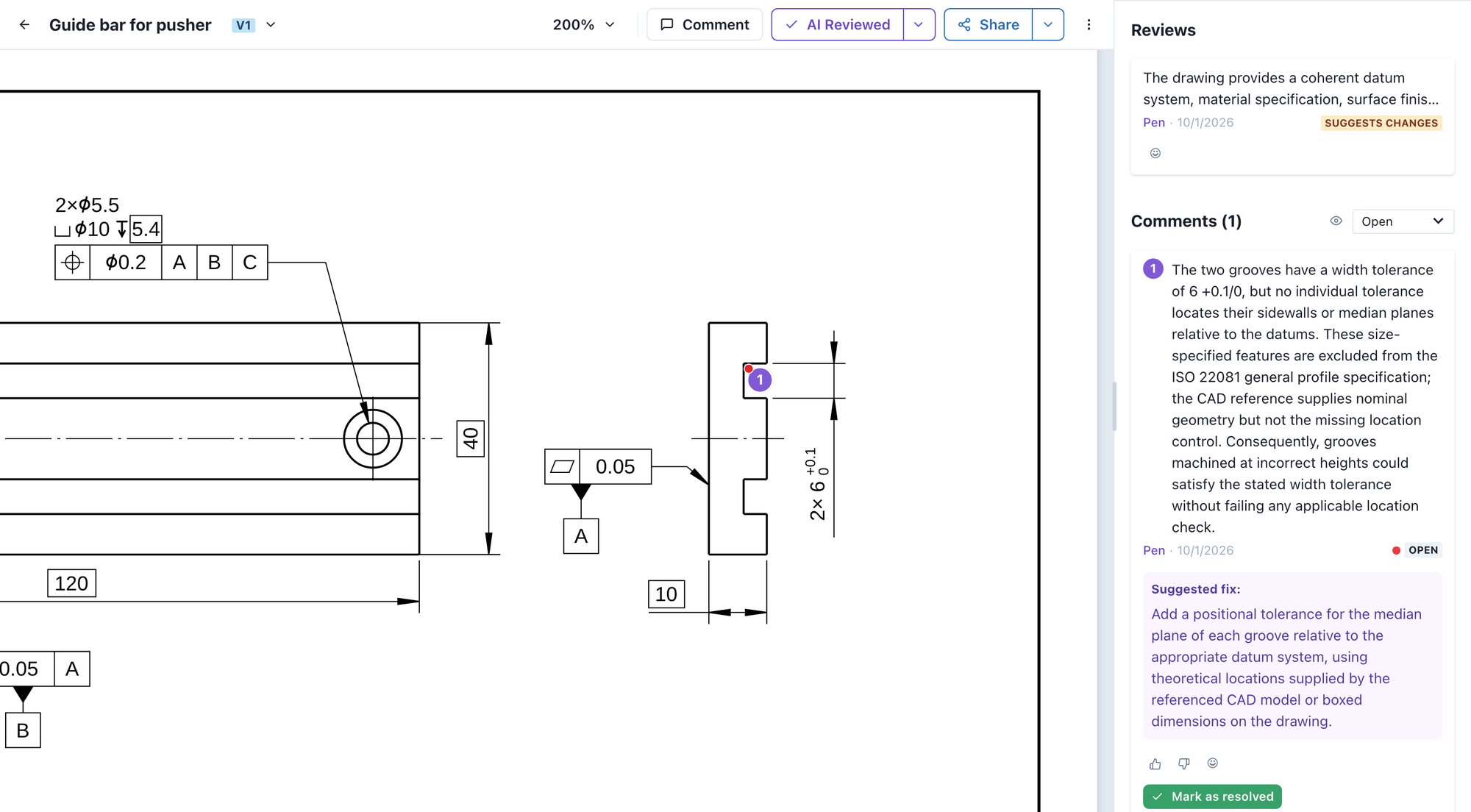
The grooves have a width of 6 +0.1/0, because the pusher’s tongues have to fit them. That tolerance has a side effect. Under ISO 22081, a feature with its own size tolerance is no longer covered by the general profile. For our drawing, that means the width of the grooves is defined, but where they sit on the bar is not. And so neither is the distance between them.
Formally, if a supplier makes this part for you, you can’t reject a bar whose grooves sit too far apart, even though the pusher with its two tongues won’t go on. In practice most shops would probably assume the profile covers the grooves. But that’s the kind of assumption a drawing is supposed to make unnecessary.
Pen 2.2 points this out:
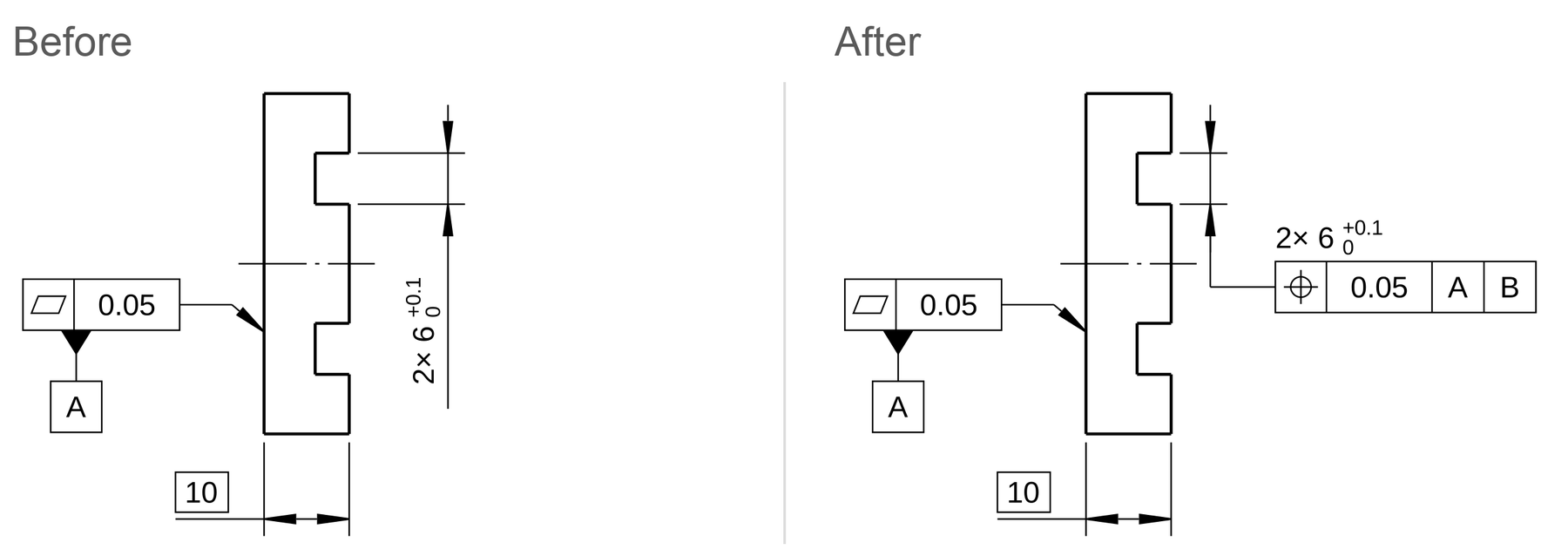
The fix is one position tolerance on the groove width, for example 0.05 to A|B.
You can run the review on this drawing yourself.
To get there, we built a dedicated test set of ISO GPS drawings. Several of them rebuild the examples in ISO 22081 and ISO 1101, others are realistic parts. Looking back at our releases, Pen 2.0 was a big improvement overall, but it still struggled with the tricky parts of ISO GPS. Pen 2.1 got most of them right and still missed some of the gotchas. Pen 2.2 is as good on ISO GPS as on the other problem classes we test for, like missing dimensions or BOM inconsistencies. And in our tests, it does so without raising false alarms. Like any reviewer, it won’t catch every error: on our main test set, Pen finds more than 80% of all errors (more in the Pen 2.1 post). Depending on your current checking process, that can be more or less than what a human reviewer catches.
The second change in 2.2 is spell checking. It now runs on GPT-6 Sol, which stopped the occasional typo Pen used to report in text that was actually spelled correctly.
Everything else in Pen still runs on GPT-6 Astra, which still has the strongest 3D understanding of the models we have tested. The ISO GPS improvements in 2.2 come from our own work around the model, the software and review instructions we build to get the best out of it for engineering drawings (often called the “harness”).
Pen 2.2 runs in every new AI review, no setup needed, so you can try it on one of your own drawings.
Footnotes
-
The example is kept simple on purpose, to show this one effect. A full functional specification would look different and would need the whole assembly. For this example I chose A, B and C as one datum per orthogonal surface. That setup is common and easy to reason about, because it works like the zero point of a coordinate system. Functionally, though, the bar could be mounted rotated by 180°, so these particular edges have no functional reason to be the datums. ↩
