ClearHandoff vs ChatGPT
Can you just use ChatGPT or Claude to review engineering drawings and CAD models? Compare how ClearHandoff feeds the model: context, collaboration, workflow.
If you’ve pasted a technical drawing into ChatGPT or Claude in the last few months, you already know modern AI can read drawings. The breadth of engineering knowledge is impressive, and geometric understanding has come a long way. So why use a dedicated tool like ClearHandoff at all?
Start with a concrete problem. In ChatGPT, you can’t point at anything. If you want to ask about a specific tolerance on a specific bore, you have to describe it in words (“the ⌀20 H7 dimension in the detail view at the upper right, below the thread callout”) and hope the model lands on the right feature. On a drawing with dozens of dimensions and half a dozen views, that’s tedious at best and misleading at worst.
In ClearHandoff, you pin a comment on the exact feature and tag @pen. The AI already knows which dimension, which view, which sheet. Skip the describing and just ask.
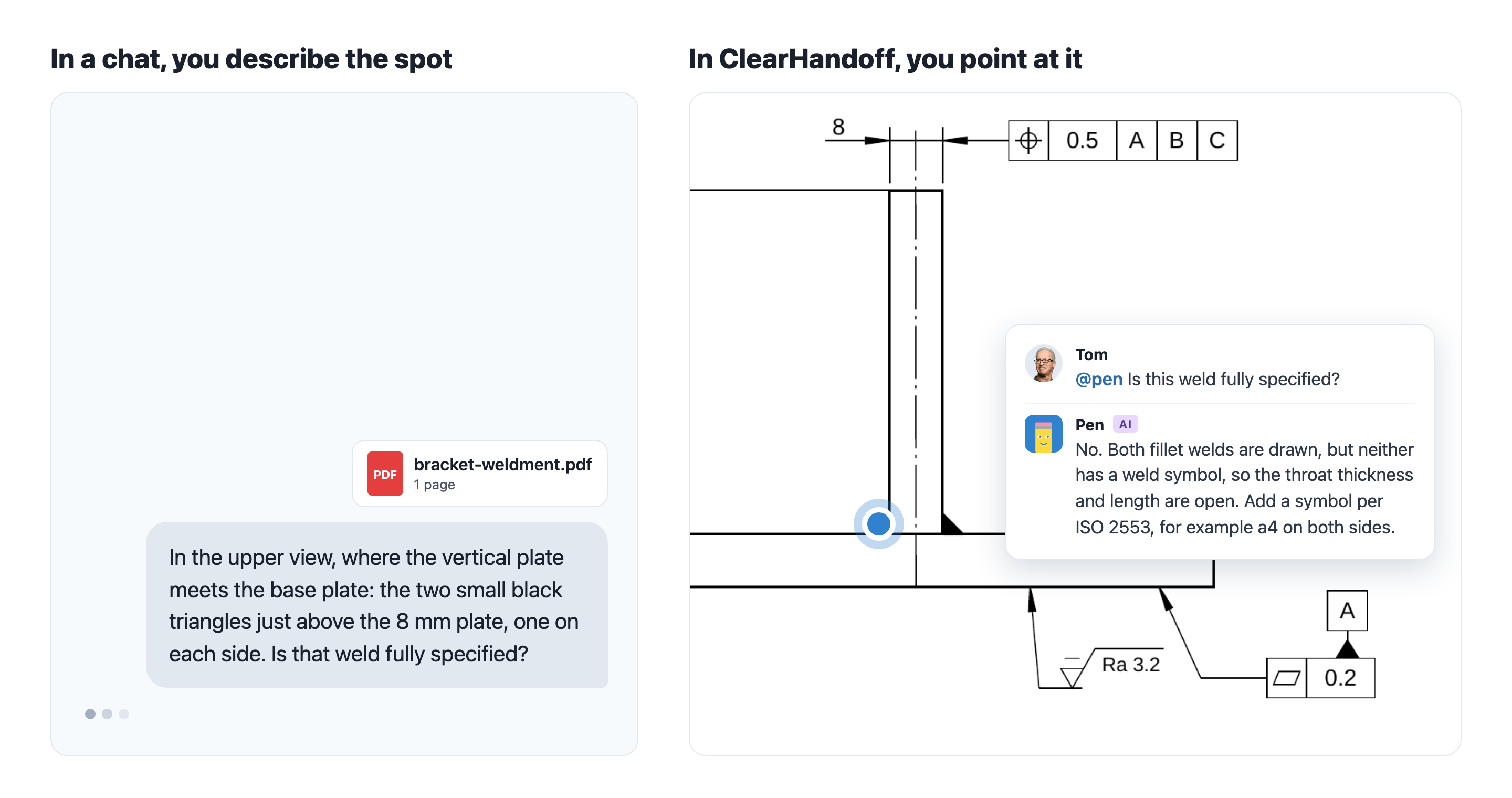
That pin is one example of a larger pattern: the model is only half the story. The other half is the system around it: what context it gets handed, how the conversation is structured, and the workflow it sits inside.
Quick Comparison
| ClearHandoff | ChatGPT | |
|---|---|---|
| Built for | AI review of CAD models and drawings, with your team and suppliers | General-purpose chat and reasoning |
| Underlying model | Frontier LLMs (currently OpenAI) | Frontier LLMs (OpenAI) |
| Drawing context | The drawing page, pin location, all comments and reviews on the drawing, review profile | Whatever you paste or upload into the chat |
| Positional awareness | Pinned comments tell the AI exactly which feature you’re asking about | You have to describe the location in words |
| Collaboration | Everyone on the drawing sees the same threads and can tag the AI | Chats live in ChatGPT, apart from the drawing and its review |
| Workflow | Comments, reviews, approvals, versions, audit trail | Chat transcript |
Same Model. Different System Around It.
ClearHandoff uses the same class of frontier AI models you’d reach for in ChatGPT or Claude. We don’t train our own. When a better model comes out, ClearHandoff improves with it.
What we build is everything around the model: the context it gets handed, how the conversation is structured, the workflow it sits inside. An LLM can read a drawing. It can’t, on its own, know which edge of which hole on sheet 3 you’re asking about, or that your shop’s laser cutter holds ±0.1 mm on 3 mm stainless.
The same goes for 3D. ClearHandoff reviews STEP models of parts and assemblies against your review profile and pins each finding to the face it concerns, so your team discusses it on the model, not in a chat.
What ChatGPT does well
- Answers a general question about a drawing you paste or upload
- Explains a GD&T frame, a tolerance standard, or a manufacturing method
- Suggests what to check on a drawing in principle
- Works for ad-hoc, one-off questions
What ClearHandoff adds around the model
Context management: the drawing, not just a screenshot
When you tag @pen in a comment, ClearHandoff assembles the context before asking the model anything. Pen receives:
- The full page your comment is pinned on, with every view and text block on that sheet
- The exact pin location, so the AI knows which feature you’re asking about without you describing it in words
- Every comment and review that already exists on the drawing, in chronological order
- The review profile used for the original AI review (your company’s preferred tolerances, manufacturing methods, standards)
In ChatGPT, you’d have to paste or upload all of that manually every time. And even then, the pin location and prior review context would be missing or half-reconstructed from screenshots.
Collaboration on the drawing, not in a chat app
A ChatGPT chat lives in ChatGPT, apart from the drawing. Even when you share it, it isn’t tied to a drawing version, and your supplier doesn’t see it on the drawing you sent them. A drawing review is a team activity. In ClearHandoff, @pen replies sit in the same comment thread your colleagues are already using. A design engineer, a manufacturing engineer, and a quality engineer can all see the question, see Pen’s answer, and reply to each other, on a specific feature of a specific drawing version. Threads are part of the drawing’s history, not stuck in a separate chat app.
A workflow, not just a conversation
ClearHandoff is a review tool for CAD models and drawings. AI help is one piece, alongside pinned comments, structured reviews, approval states, version tracking, and a shared-link handoff to manufacturing. ChatGPT is a good chat tool, but it isn’t a review system. No open-vs.-resolved findings. No drawing versions. No audit trail. No way for a supplier to comment on the drawing you sent them.
Pricing
ChatGPT offers a free tier and paid plans for individuals, teams and enterprises. You can try ClearHandoff with 20 free AI credits: sign up, upload a drawing or model, run an AI review, and tag @pen with follow-up questions. Paid plans have a public price per user with AI credits included, starting at EUR 20 or USD 25 a month. Follow-up questions to Pen are free. See pricing for details.
Who Should Choose What?
Use ChatGPT if:
- You have a one-off question about a single drawing
- You’re learning a concept (what a GD&T frame means, which tolerance to aim for)
- You want a general reasoning partner, not a review workflow
Use ClearHandoff if:
- You review drawings or CAD models regularly and want AI grounded in the full file, not a pasted screenshot
- Multiple people need to collaborate on the same feedback
- You want the AI to know exactly which feature you’re pointing at, without describing it
- You care about versions, approvals, and a clean manufacturing handoff
The two don’t cover the same job.
FAQ
Can’t I just paste my drawing into ChatGPT?
You can, and for a single quick question it often works. What you lose is the context the model doesn’t see: which feature on the drawing you’re asking about, what other reviewers have already flagged, and which standards your team follows. ClearHandoff assembles that context automatically for every question.
Does ClearHandoff use a proprietary AI model?
No. We use the best generally available frontier models (currently from OpenAI) and don’t train our own. When those models get better, ClearHandoff gets better with them. What sets ClearHandoff apart is the system around the model (context, extraction, workflow), not the underlying model itself.
Is Pen better than ChatGPT at reading drawings?
Pen and ChatGPT share the same underlying model class. The difference is what each one sees. Pen sees the page, the pin location, every prior comment on the drawing, and your review profile. ChatGPT sees what you paste. That gap matters most for questions tied to a specific feature on a specific drawing, like “is this tolerance realistic for our laser cutter on 3 mm stainless?”, where the model needs to know exactly which dimension you mean.
How does pricing work?
You can try ClearHandoff with 20 free AI credits, without procurement. Paid plans have a public price per user, starting at EUR 20 or USD 25 a month with 100 AI credits, and every added user brings 100 more credits to the team. Follow-up questions to Pen are free. ChatGPT has its own free and paid plans, separate from ClearHandoff.
Try ClearHandoff on your own files
Start with 20 free AI credits, no credit card needed.
Upload a model or drawingOr try an example: a drawing · a 3D model