ClearHandoff vs CoLab
Looking for a CoLab alternative? Compare ClearHandoff and CoLab AutoReview on AI review of CAD models and drawings, setup and pricing.
ClearHandoff and CoLab both help mechanical engineering teams review 3D models and drawings with colleagues and suppliers, with AI. With ClearHandoff you run the AI review first, fix the obvious issues, and then ask your team and suppliers to look. It is self-serve at a public price per user. CoLab is an enterprise platform for design reviews across an organization, sold through sales. For teams looking for a CoLab alternative with a public price, this page compares the two.
Quick Comparison
| ClearHandoff | CoLab | |
|---|---|---|
| Focus | AI review for CAD and drawings, with your team and suppliers | Design review and collaboration across design phases |
| AI approach | Built AI-first, with the AI review as the first step, on general-purpose LLMs (e.g. OpenAI) that improve with each model generation | AutoReview, proprietary AI added to the collaboration platform later, purpose-built for CAD and drawing review |
| File support | STEP (parts and assemblies, with PMI), PDF and DXF drawings | Native CAD and neutral formats |
| Integration | REST API for PDM/PLM and automation tools | REST API and PLM integrations |
| Languages | English, German, Dutch | English |
| Company | SankeyArt GmbH, Germany | CoLab Software, Canada |
| Deployment | Cloud-based (SaaS) with self-serve signup, or your own cloud or on-premise on Enterprise | Cloud-based (SaaS), sales-led onboarding |
| Pricing | Try it with 20 free AI credits, then a public price per user with AI credits included | Enterprise pricing (contact sales) |
Different Focus Areas
ClearHandoff: AI Review for CAD and Drawings
ClearHandoff is built around an AI first pass before the human review. Upload a CAD model and the AI checks it against a review profile with your team’s rules, for example CNC machining, sheet metal or assembly release. It flags things like corners a cutter cannot reach, walls too thin to make, holes that are not a standard size and parts that clash, and pins each finding to the face it is about. Upload a drawing as PDF or DXF and the AI checks it the way an experienced engineer would: standards compliance, tolerances, title block completeness, dimensions, GD&T, surface finishes and design-for-manufacturing issues.
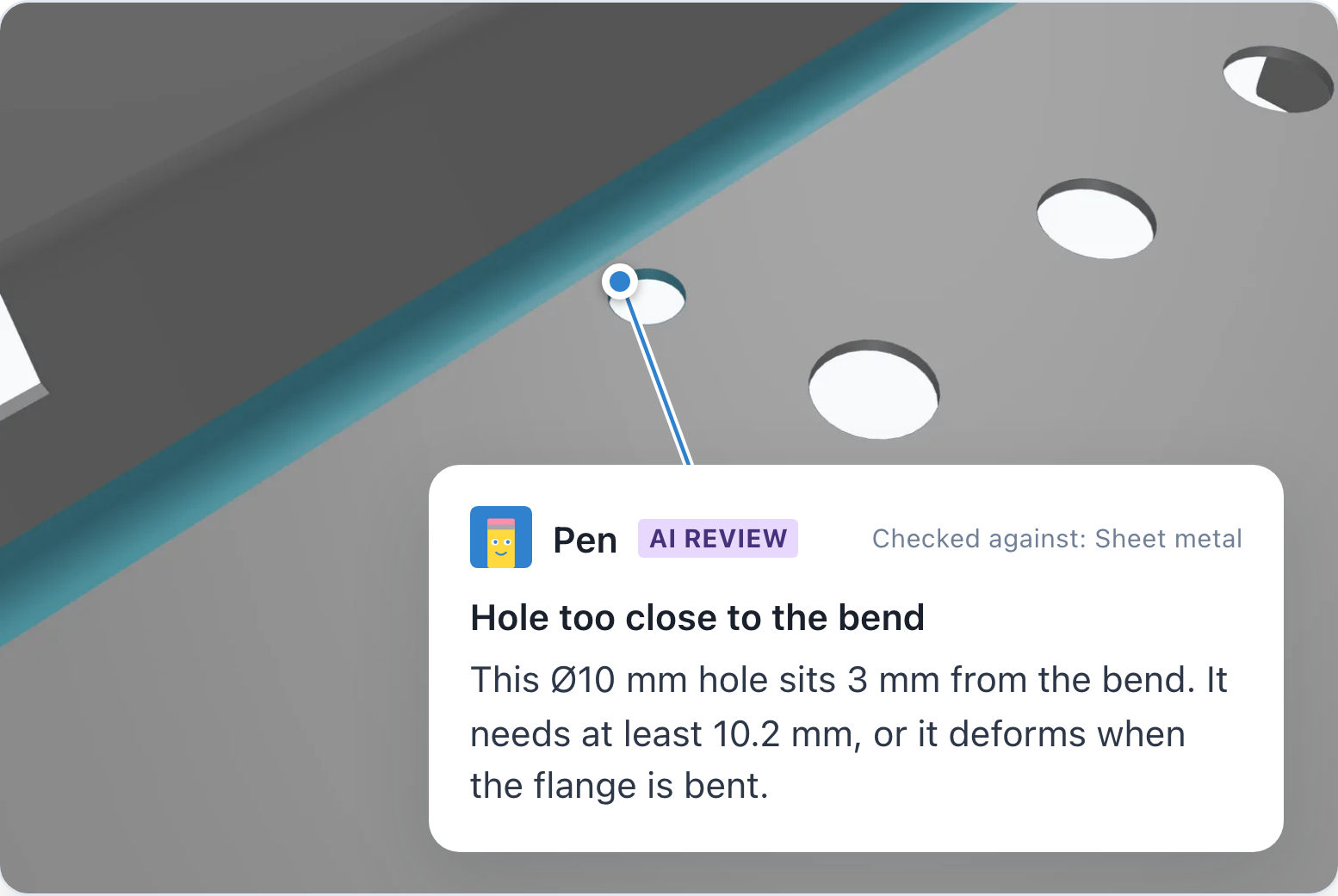
After the AI, your team and your suppliers review, comment and approve in the browser, with the model and its drawings in one package. The drawing stays the document manufacturing works from, and ClearHandoff helps catch errors in both before they go there.
CoLab: Design Review Across Phases
CoLab (branded as “EngineeringOS”) is a broad design review and collaboration platform for large engineering organizations. It supports 3D CAD models and drawings across multiple design review gates, from internal reviews through supplier collaboration and DFM reviews. Teams can view, section, measure and annotate 3D models in a browser without needing the native CAD application.
CoLab is a good fit for enterprises that want one platform for structured review workflows across the entire design process, rolled out across the whole organization.
AI Capabilities
ClearHandoff was built around AI review from its first version. CoLab started as a collaboration platform and added AI review later with AutoReview.
ClearHandoff
ClearHandoff uses the best generally available large language models (currently OpenAI) to review 3D models and drawings. It does not train its own models and does not train on user data. It adapts to your company through context instead: your review profile and reference documents go into every review. The leading AI coding agents work the same way, adapting to a codebase through its instructions and files, not through retraining.
On 3D models, the AI reads sizes and positions from the STEP file itself and checks what your review profile asks for:
- Sharp internal corners and thin walls
- Hole sizes and depths
- Clashes between parts in an assembly
- Missing tolerances, when the STEP file carries PMI
On drawings, it performs the same checks a human reviewer would: standards compliance (e.g. ISO 128, ASME Y14.5), tolerances, title block, dimensions and annotations, surface finish and GD&T, and design for manufacturing.
For both, describe your rules in your own words (preferred tolerances, manufacturing methods, materials, or anything else reviewers should look for) and add reference documents such as design guidelines. With this context, the AI reviews against your own standards, not only general ones, and its findings fit how your company designs and manufactures.
CoLab
CoLab offers “AutoReview”, a proprietary AI that comes in two flavors:
- AI Drawing Review: Analyzes multi-sheet drawing packages as a set, checking cross-sheet consistency, metadata, and compliance with uploaded company standards.
- AI CAD Review: Analyzes 3D CAD geometry for manufacturability (DFM), company standards, and past review feedback.
For example, it flags missing or incorrect countersinks and checks wall thickness and mold release for molded parts. CoLab’s AI can also reference feedback from previous reviews of similar parts.
Pricing
You can try ClearHandoff with 20 free AI credits and no procurement process. Paid plans have a public price per user: Pro starts at EUR 20 or USD 25 a month for one user and 100 AI credits, and every added user brings 100 more credits to the team. A team of five costs EUR 100 or USD 125 a month, with 500 credits. A deep review of a drawing uses 10 credits, a 3D model 10 to 30 depending on its size. Uploads, comments, approvals and guest reviewers are free. Scale adds unlimited users, and Enterprise runs in your own cloud or on-premise. See pricing for details.
CoLab uses enterprise pricing. There is no public pricing page. Contact their sales team for a quote.
Collaboration & Workflow
ClearHandoff puts the AI findings, your team’s comments and the approval in one place for every file. Comments are pinned to a face on the model or a spot on the drawing and keep their camera view, so nobody has to ask which hole you meant. Request a review from anyone inside or outside your company. Guest reviewers are free, open the file in the browser and need no CAD license. A model and its drawings can be uploaded as one package, and a package revision is approved once every file in it is approved. A REST API lets you trigger reviews from your PDM, PLM or automation tools and get structured results back.
CoLab provides annotations tied to 3D geometry, discussion threads, and issue tracking. It integrates with PLM systems.
File Format Support
ClearHandoff accepts STEP files (.step, .stp) with a single part or a whole assembly, exported from SolidWorks, Inventor, Fusion, Onshape, Creo, NX or any other CAD system. When the STEP file carries PMI (AP242), its dimensions, tolerances and datums are shown on the model. Drawings go in as PDF or DXF.
CoLab supports native CAD formats (SolidWorks, CATIA, NX, Creo, among others) and neutral formats. PLM integrations allow pulling files from existing systems.
Who Should Choose What?
Choose ClearHandoff if:
- You want the AI to check a model or drawing before your colleagues do
- You review with people outside your company and want them in the same place, for free
- You want to start today at a public price per user, without an enterprise contract or a sales call
- You need to run it in your own cloud or on-premise, with the Enterprise plan
Choose CoLab if:
- You are a large enterprise that wants one platform for design reviews across review gates and your whole engineering organization, including joint development with partners
- You prefer a sales-led procurement process
FAQ
Can ClearHandoff replace CoLab?
For many teams, yes. Both review 3D models and drawings with colleagues and suppliers, with AI checking them. ClearHandoff is built for teams that want the AI to review a file before their colleagues do, and want to start right away at a public price. CoLab is built for large enterprises that want a design review platform rolled out across many review gates and the whole engineering organization.
What are the alternatives to CoLab?
It depends on what you use CoLab for. For design reviews of CAD models and drawings with AI built in: ClearHandoff. If you want to stay inside your CAD or PLM system: Siemens Teamcenter Share, Dassault Systèmes 3DEXPERIENCE, or Autodesk Fusion with Vault. For dedicated manufacturability and cost analysis: aPriori or DFMPro.
How much does CoLab cost?
CoLab does not publish its prices. You get a quote from their sales team. ClearHandoff starts at EUR 20 or USD 25 per user a month, with AI credits included.
Does ClearHandoff work with 3D CAD files?
Yes. Upload a STEP file of a part or an assembly. The AI reviews it against your review profile and pins its findings to the faces they concern, and your team and suppliers comment on and approve the model in the browser. Drawings go in as PDF or DXF, on their own or together with the model in a package. See CAD review for how it works, or try it with an example model.
How does ClearHandoff’s AI approach differ from CoLab’s?
ClearHandoff uses the best available general-purpose AI models (currently from OpenAI) and does not train its own models or use customer data for training. CoLab has built proprietary AI (AutoReview) for both drawing and CAD analysis. The models ClearHandoff builds on are tested on public benchmarks, for example BenchCAD for 3D CAD understanding, so you can see how capable they are and how fast they improve. As far as we know, there is no public data on how well CoLab’s AutoReview performs.

Source: benchcad.com, IoU score by release date, as of September 8, 2026. Newer models may have been added since.
How long does it take to set up ClearHandoff?
Minutes. Create a free account, upload a CAD model or a drawing, and you’ll get AI-powered feedback right away. If you want to integrate with your existing systems, the REST API lets you connect your PDM, PLM, or automation tools without a lengthy setup project.
Try ClearHandoff on your own files
Start with 20 free AI credits, no credit card needed.
Upload a model or drawingOr try an example: a 3D model · a drawing