AI in Mechanical Engineering Design: Between Magic Demos and Real Workflows
Where AI already works in mechanical engineering design, where it doesn't, and who will build what's missing.
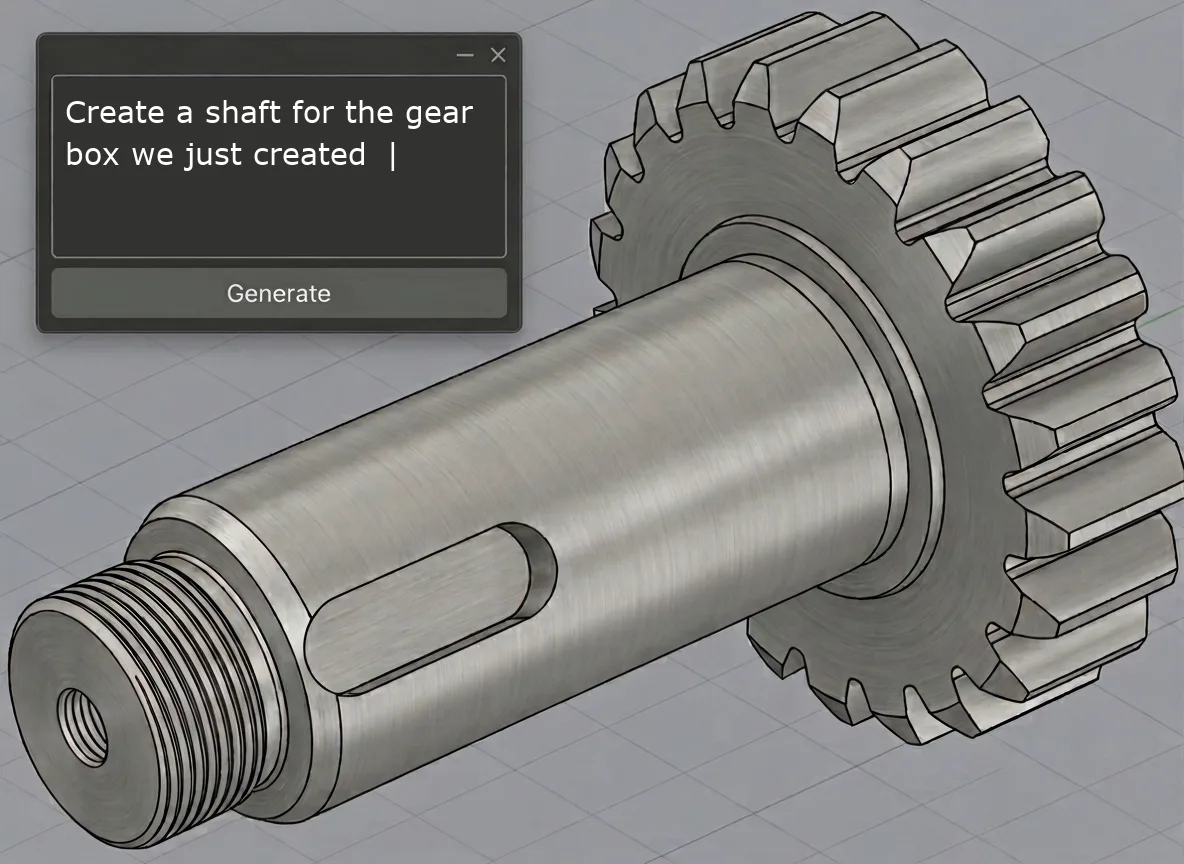
Where does AI actually work in mechanical engineering design today, where doesn’t it, and who will build it?
Multimodal LLMs have gotten surprisingly good at understanding engineering artifacts: specifications, 3D geometry, and drawings. That opens up real opportunities for rethinking how engineering work is done. Some workflows already benefit from AI today. Others are held back by data access. And some of the most hyped use cases, I don’t buy.
This post is my take on where AI changes mechanical engineering, where it doesn’t, and who will build what’s missing. I’m focusing on multimodal LLMs like GPT and Gemini, not classical ML.
Artifact creation
3D CAD generation
This is the area that gets the most attention and the most impressive demos. But I think the discussion often misses the point.
AI can generate 3D CAD models today. There are working approaches: AI writing OpenSCAD or CadQuery scripts, or calling CAD vendor APIs to build parametric models through sequences of operations like extrude, cut, and fillet [1-4]. For simple to moderately complex parts, these produce real, usable geometry.
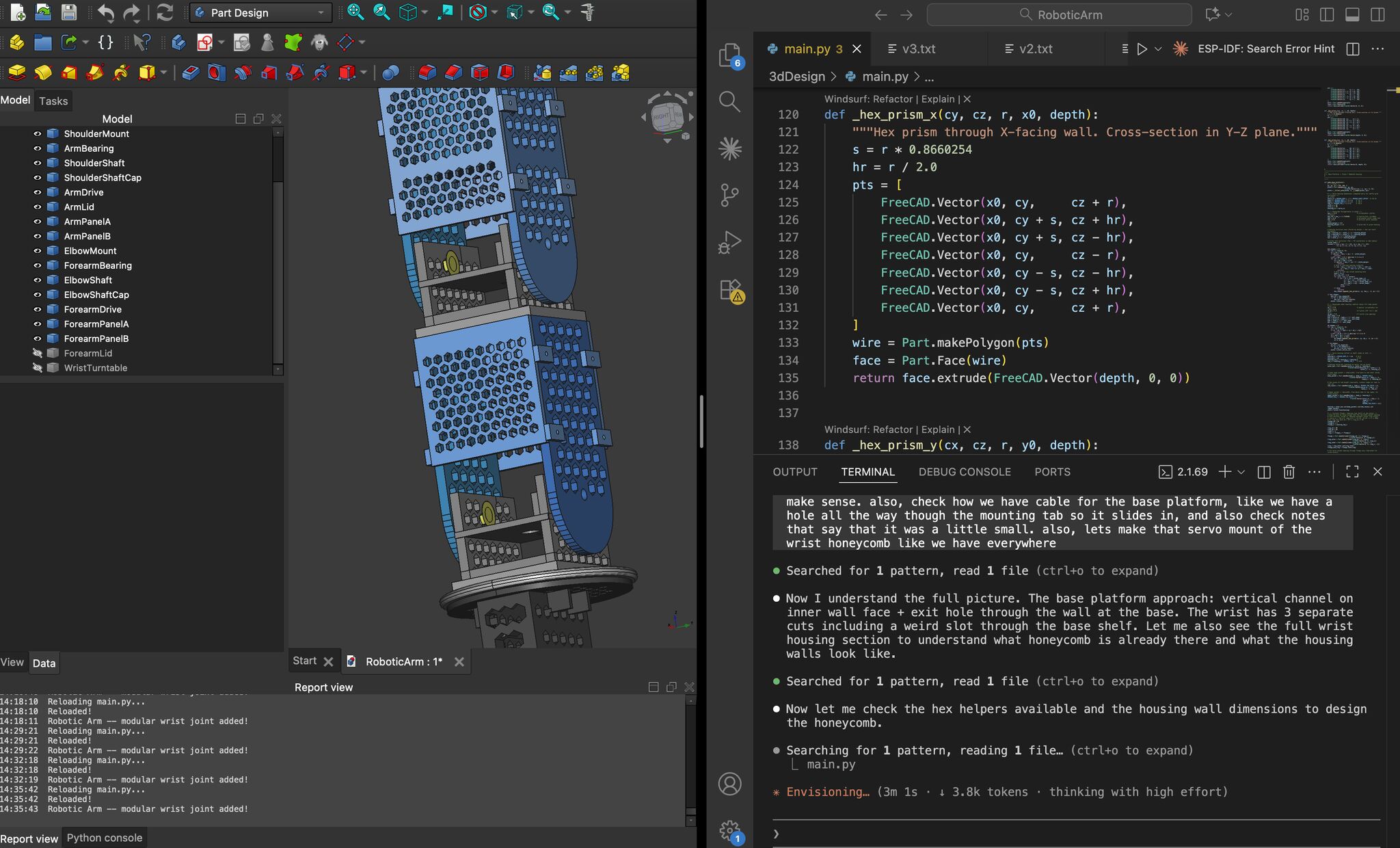
I’ve had fun playing around with it. But the more interesting question is: is this actually a better workflow?
If you had a specification that fully described the part — every dimension, tolerance, material, interface — then AI generation would actually be compelling. Hand the spec to the AI and let it build the model. Why not? But in practice, specifications are rarely that complete. Engineers discover and decide things as they model. What geometry works based on which manufacturing method, how the part interfaces with its neighbors, what trade-offs to make between cost and performance — these decisions happen during modeling, not before it.
And for that kind of interactive, discovery-driven work, a CAD interface is purpose-built. Clicking an edge to add a fillet, selecting a face to extrude from, dragging geometry to see how it behaves — these interactions are optimized for manipulating 3D. Describing the same operations in text is harder, not easier. “Fillet the edge where the top face meets the left rib” is slower and more ambiguous than just clicking the edge. And when the specification is incomplete, the AI makes its own decisions — a wall thickness of 3 mm instead of 4 mm, a radius of 2 mm instead of 5 mm. In CAD, the engineer consciously types in the value and immediately sees the result. Via text, they’d have to specify every value explicitly — more work, not less.
There are areas, however, where AI-driven CAD generation gets interesting. One is conceptual design exploration. Imagine you’re in the early stages: you have functional requirements and rough constraints, but you haven’t committed to a working principle and type of geometry yet. Plain bearing or ball bearing? Connect via bolts or weld it? You could give an AI the requirements and have it generate a dozen conceptually different solutions — not polished, production-ready models, but rough 3D concepts that represent genuinely different approaches. Think of it as the 3D equivalent of an engineer sketching alternatives on a whiteboard, but faster and more varied.
This is valuable because engineers tend to anchor on the first concept that seems to work. Having AI generate diverse candidates — a cast housing vs. a welded fabrication vs. a sheet metal enclosure for the same function — lets teams explore each option in more detail before committing to one direction.
There are other use cases where AI steering a CAD API makes sense. One is CAD configurators. Many companies use rules-based CAD code to generate product variants, like vendors building manufacturing lines or testing stands from Bosch Rexroth or 80/20 extrusions. Replacing parts of that rigid configuration code with an LLM could allow for more flexibility without rewriting the entire rule set.
More speculative is image to CAD: an engineer on a production line takes a picture of a broken part they can’t identify and gets a starting point for designing a replacement part. Whether this is actually useful in practice remains to be seen.
For AI-driven CAD generation to work well, it needs to call a parametric modelling API. CAD vendors are best positioned here because they control the file formats and parametric kernels. Siemens NX, Dassault’s SolidWorks and CATIA, and PTC’s Creo and Onshape each have proprietary feature tree structures that they can integrate AI into directly. But some use cases like image to CAD or configurators may not be what traditional CAD customers are asking for, so the big vendors may not prioritize them.
That leaves room for other companies to build on top of existing CAD platforms. For that, good public APIs matter. If a newcomer wants to build on an established platform instead of open source solutions, Onshape stands out here as one of the few CAD systems built for the cloud from the start.
There’s tension, however, for leaning into such new applications for products like Onshape: the incumbents’ business models rely on selling seat licenses. If an AI agent calls the API and engineers rarely open the UI, why pay for the license? That’s a classic innovator’s dilemma. A cloud-hosted headless CAD kernel — pay per usage, not per seat — could become much more interesting in the coming years. And this is the kind of thing the big CAD vendors will think twice about building, since it competes with their traditional business model and their existing customers won’t need it.
My take: 3D CAD generation will find its niche in conceptual exploration and in modular CAD workflows that currently are based on more strict rules, but it won’t replace the traditional modeling workflow anytime soon — not because the AI isn’t capable enough, but because the traditional workflow is often the right interface.
Drawing creation
Manufacturing drawings are mostly derived from 3D models. This can be fully automated with AI and the CAD vendors are building the functionality. Autodesk Fusion’s automatic drawing creation [5] is an example of that. You have a 3D part, and the AI generates a 2D drawing with views and dimensions, just a little bit of detail tweaking by the human needed at the end. This is a natural fit for a CAD vendor: they have the 3D model, they know the geometry, and the drawing is a direct derivative. Autodesk is doing a good job here, and it’s a clear case of an incumbent integrating AI into an existing workflow where it makes immediate sense.
In principle, you don’t need a 3D model to create a drawing. For example, I have created drawings by hand of simple sheet metal parts or I created quick drawings on the computer without a 3D model, that I then sent to a supplier who I asked for a full housing design based on their standard designs with my specified openings. For such use cases, it might make sense to generate a first draft of a 2D engineering drawing from a text description. Such text to drawing [6] is possible today for simple geometries: brackets, flanges, flat profiles. You describe the part, and the AI produces a dimensioned drawing. As with 3D parts, this only makes sense for simple parts where describing things in text is easier than using a drawing tool’s mouse-focused UI. For complex parts, I don’t want to describe a super long text, I want to click an area instead of describing the geometry in words.
Overall, I think drafting can be significantly improved by AI. However, it’s not going to be a disruption, but an improvement. The pattern is human-AI-human: the engineer decides what kind of drawing is needed, AI creates a full first draft, and the engineer details it — making sure the right things are in focus and deciding when it’s ready for approval or manufacturing.
Review and analysis
Drawing review
This is the area I know best, and one where AI is also immediately useful. Modern multimodal LLMs can look at a 2D engineering drawing and identify real issues: missing dimensions, questionable tolerances, DFM problems, title block mistakes.
It’s not perfect: with increasing complexity — the easiest proxy is the number of elements on the drawing — performance gets worse and the correct context has to be supplied. But when utilized correctly, the accuracy is high enough to be practically useful as a first-pass check. Think of it as a spell checker for drawings: it won’t catch every nuance a senior engineer would, but it catches the obvious mistakes that waste everyone’s time in review meetings.
This includes DFX checks: design for manufacturing, design for assembly, design to cost, design to standards. What’s interesting is that AI doesn’t need hard-coded rules for this. It has a general understanding of mechanical engineering and manufacturing processes and can flag issues like “this wall thickness will be difficult to injection mold” or “this tolerance drives the cost up significantly” without someone encoding every rule manually. That’s a genuine new capability that didn’t exist before LLMs.
Foundation models cover a huge breadth of published engineering knowledge. That means the model will tell you that it’s impractical to specify a general surface roughness that includes weldments, or that the ISO tolerance standard in your title block conflicts with the ASME notation in your callouts. If you know how LLMs work, this is not surprising — it’s trained on all of it.
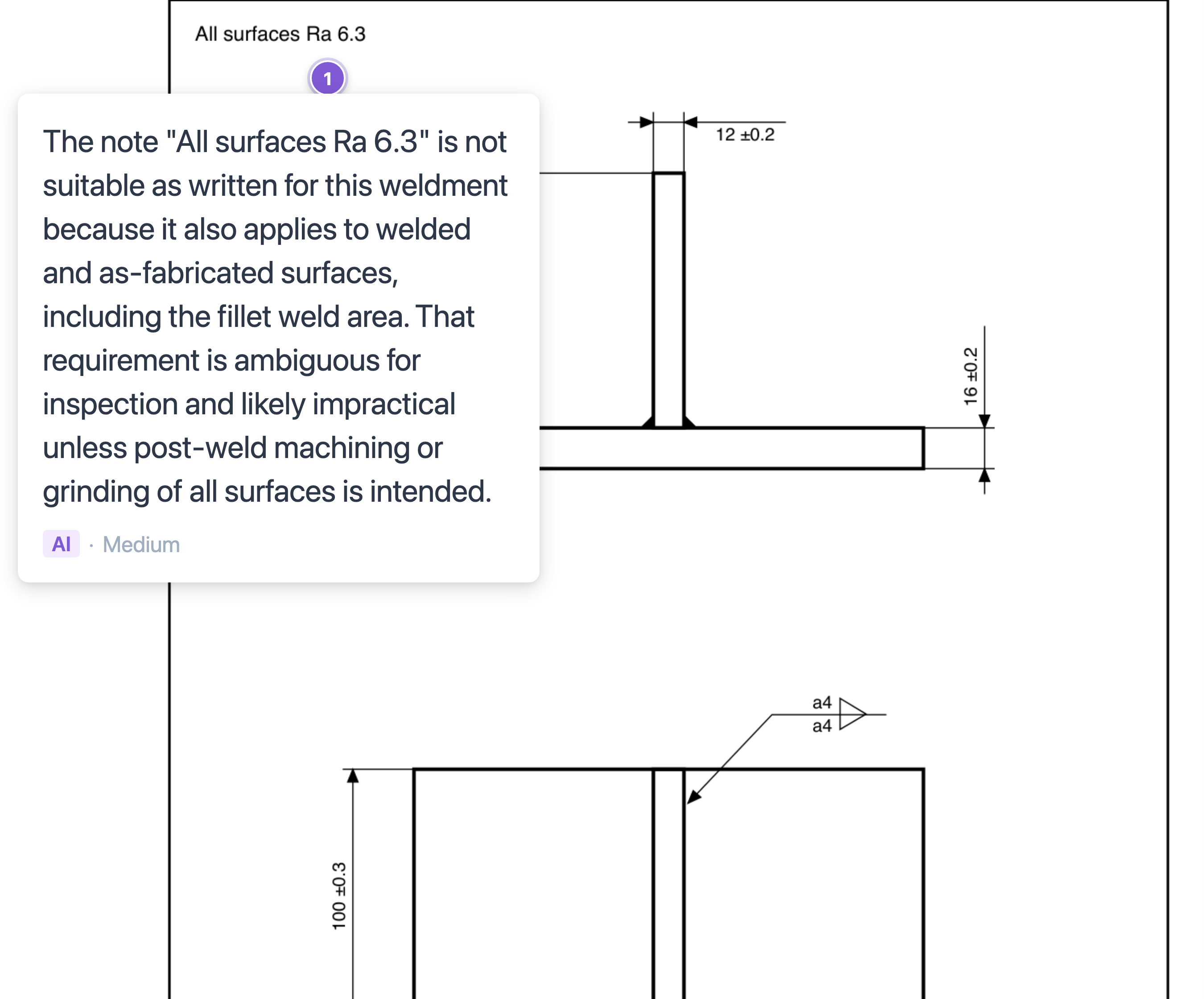
What surprises me more is the geometric understanding and reasoning. If you think of a vision model as a combination of OCR, image classification, and an LLM — text recognition, “dog or cat?”, language processing — you’d expect it to fail at engineering drawings. Reading one means relating dimension lines to features and holding a 3D representation in your head across multiple views. And it does have blind spots: I once found that the vision model thought a nearby dimension also applied to an undimensioned hole. But more often than not, it gets this right. For me, that’s the more unexpected part.
It’s good enough to be useful. But to further improve, AI drawing review can take inspiration from software engineering: tool use. The same way coding agents call linters, version control tools, and test suites, an AI drawing reviewer can call specialized engineering tools — sheet metal manufacturing simulation (can this bend actually be formed?), tolerance analysis, cost estimation models. The AI provides the general reasoning and orchestration, and the specialized tools provide determinism and precision. This combination of general understanding and precise tooling is where the highest quality will come from, and it’s something that needs to be built out.
Drawing review can be a big bottleneck in the release process. I see this in the companies I talk to. Some require two approvals for each drawing, which slows releases and costs significant senior engineering time. Others don’t do peer review at all — to avoid delays, they let the design engineer release the drawing directly, which inevitably means more mistakes reaching the shop floor. In both cases, AI flagging issues before the human review starts makes the process faster and catches things that engineers miss.
Who should build this?
CAD vendors like Siemens, PTC, and Dassault could add this to their existing tools, and they’re well positioned to do so for customers already in their ecosystem. I believe startups like us [7] also have an opening here because this workflow doesn’t require deep CAD integration — you just need the drawing as an image or PDF, which makes it possible to build a standalone product that works across CAD platforms. This matters especially at the manufacturing handoff, where drawings are reviewed by suppliers who often use a different CAD system than the OEM.
Design reviews in the conceptual and embodiment stage
In industries like automotive or medical devices, a new design typically goes through formal design reviews long before final manufacturing drawings are created. In systematic engineering design, such reviews represent gates in the conceptual and embodiment design phases [8]. Can we use this material? Does this concept meet the requirements? Are we making the right trade-offs?
AI can already help here, but differently than with manufacturing drawings. At this stage, the inputs are less structured: meeting notes, sketches, requirement documents, in-progress CAD assemblies, simulation results, informal calculations. LLMs are good at processing this kind of unstructured information. They can cross-reference a design concept against a requirements list and flag gaps, summarize trade-off analyses, and point out inconsistencies.
DFX thinking also fits naturally here. At the conceptual stage, AI can already push back on design directions that will be expensive to manufacture or hard to assemble — not with precise calculations, but with the same kind of general reasoning a senior engineer brings to a design review. “Have you considered that this geometry requires a 5-axis CNC machining setup?” is more valuable at the concept stage than any detailed DFM analysis later.
The challenge is data access. Processing the unstructured inputs — meeting notes, sketches, informal calculations — is something LLMs handle well out of the box. However, they need to be made available to the model. And in earlier design phases, where things are messier, the context the AI gets is also less reliable. On top of that, companies conduct these reviews very differently — some work from PowerPoint presentations, others from CAD models, others from early drawings. Any AI solution either needs to define the process or cater to each company’s existing one. At the risk of repeating myself: CAD and PLM vendors are in principle well-suited to build here, since they sit on the data. But traditionally, they haven’t focused on cloud-based collaboration across company boundaries. CoLab [9] is a startup building in this space.
There are more workflows where AI will play a role that I haven’t covered here: BOM management, part reuse and rationalization [10], simulation setup and analysis, change impact analysis, requirements traceability, and technical documentation.
Who orchestrates engineering?
Beyond individual workflows, there’s also the question of the layer above them: an AI orchestration layer for engineering. Not a tool that reviews a drawing or generates a part, but a system that manages the end-to-end process — “take this requirements spec, check it against the existing design, draft a first version for the part, analyze it and flag issues, run a DFM analysis, if required create an update v2, create a manufacturing drawing.”
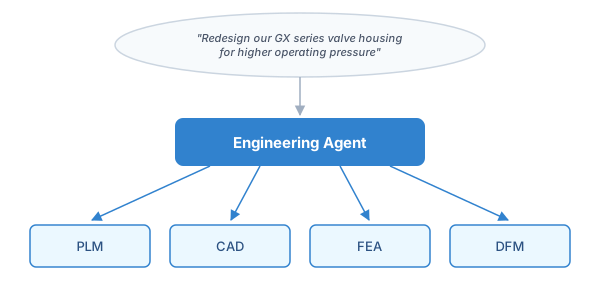
Software engineering gives us a preview of what this could look like. Think Claude Code, but connected to CAD and PLM. Or more autonomous: OpenClaw [11] runs engineering tasks triggered by events, without a human in the loop.
Some are building this natively for engineering. Zoo’s Zookeeper [12] embeds an AI agent directly into their CAD platform. Synera [13] and bananaz [14] connect CAx and PLM tools to enable workflow orchestration. Who builds the dominant orchestration layer — CAD vendors who own the data, AI labs who see engineering as the next vertical to focus on after software, or startups that don’t owe loyalty to any single CAD platform — is one of the most interesting open questions in this space.
The bigger picture
Looking across all these workflows, a few patterns emerge:
Let AI review. Or review and finish what AI started. AI makes mistakes — that’s inherent to its probabilistic nature. Given that, first-pass reviewing is an easier path to value than AI creation of artifacts. An AI pointing out a few important issues is already valuable. In generation, getting a few things right but completely missing others can make the result worse than useless — below the threshold where it’s faster to just do it manually from scratch. That’s why I expect AI to be more of a reviewer and advisor before it becomes a creator.
Data access and formats are often the bottleneck, not AI capability. Many of these workflows are held back not by model limitations but by the difficulty of accessing and structuring engineering data. CAD files are in proprietary formats. Requirements live in disconnected systems. Part databases are messy. Solving the data integration problem is important and difficult. We may also see new data formats that are easier for LLMs to handle. The most common drawing exchange format, DXF, is a cryptic format first released in the 80s with a specification in PDF. When I built our drawing tool, I ended up creating a JSON-based representation instead — not because I planned to, but because it turned out to be far more friendly to LLMs.
The big CAD companies will build what their customers ask them to. CAD and PLM vendors are strong where AI features can be integrated into their existing software and where their customers are already asking for solutions — drawing generation from the 3D model or BOM management and part reuse. They have the file formats, the data, and the customer relationships. For everything else — reviewing and handing off designs to suppliers, agents that work across systems, documentation tools independent of any specific CAD — expect smaller companies to fill the gaps.
APIs matter more than ever. There’s a broader architectural shift happening across all software: increasingly, users will interact with AI agents that sit outside any single application and call into specialized tools via APIs. This is already happening in software development — coding agents call CLIs, linters, test runners, and version control systems to get work done. The same pattern will apply to engineering design. An AI agent working on creating a quote for a customer who wants an adaptation for their machine might need to call a CAD system to query geometry, a PLM system to check which revision is in production, an ERP system to get supplier lead times, and a DFM simulation to validate manufacturability — all in one workflow. Engineering software that exposes clean APIs will be part of these workflows. Software that doesn’t will get bypassed.
AI in mechanical engineering is very early. Many mechanical engineering companies have not even moved their tooling to the cloud yet. We’re also still early in AI capability: foundation models and the engineering AI tools built on them will be significantly better in two years than today. But I think the direction is already visible: AI will become a part of the mechanical engineering workflow, not as a replacement for engineers, but as a tool that handles repetitive tasks, has this super-broad knowledge at its disposal, and assists engineers so they can focus on the parts that require giving direction, judgment, and ownership. And now that we have seen the magic demos, the interesting part starts: building it into real workflows.
References
[1] Text-to-CadQuery: A New Paradigm for CAD Generation
[2] Generating CAD Code with Vision-Language Models for 3D Designs
[3] CAD-Coder: An Open-Source Vision-Language Model for CAD Code Generation
[4] Roman Likhachev’s post on LinkedIn on Claude Code for CAD
[5] Autodesk Fusion: AI Drawing Automation
[6] ClearHandoff: Text to Drawing
[7] ClearHandoff — AI for drawing reviews
[8] Pahl, G. and Beitz, W. (1977). Engineering Design: A Systematic Approach. Springer. — The standard textbook for systematic engineering design.
[9] CoLab AutoReview — AI for design reviews
[10] PTC Launches New Windchill AI Parts Rationalization Capabilities
[11] OpenClaw
[12] Zoo — CAD platform with built-in AI agent
[13] Synera
[14] bananaz
